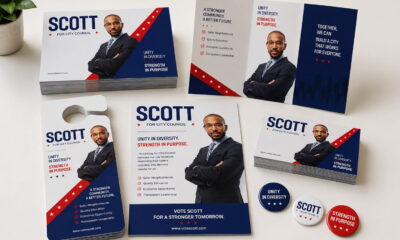
Political campaign materials should do three things well: keep a consistent look, meet legal requirements, and be ready for voters when needed. Whether you’re making brochures, mailers, posters, or event handouts, each piece should reflect the campaign’s identity and provide clear, accurate information that meets the requirements.
The challenge is keeping everything aligned across multiple projects, deadlines, and vendors during an election. This guide offers practical tips to help you make campaign materials that look consistent, follow the rules, and keep your team organized from start to finish.
1. Treat Your Campaign Materials as One Connected System
All your election print materials should show the same campaign theme and message you want voters to notice. If you use the same colors, logos, messages, and design in every brochure, poster, mailer, and handout, voters will recognize your campaign more easily wherever they see it.
Set clear standards for your logos, colors, fonts, candidate photos, slogans, key messages, and required disclaimers before you start making campaign materials. You can create a checklist to help you maintain consistency in your materials, provide voters with a consistent experience, and make future projects easier to manage.
2. Create Templates Before Campaign Activities Begin
A great way to save time during an election is to make templates ahead of time. A well-designed template should include the approved branding elements, color standards, logo placement, and compliance language.
Afterward, apply the design templates to your brochures, direct mail pieces, posters, volunteer handouts, fundraising materials, and event signage. Instead of creating a design for every piece, your team can focus on updating information while maintaining a consistent look and feel.
Templates work especially well for:
- Candidate brochures
- Voter outreach mailers
- Fundraising appeals
- Event posters
- Volunteer recruitment materials
- Community event handouts
Getting these materials ready ahead of time can really speed things up when the campaign gets busy.
3. Sort Out Design Updates to Keep Everyone At the Same Page
To keep election materials consistent, it’s also important to track design updates and share them with all campaign teams.
A Campaign Asset Control Sheet is an easy way to keep everyone on the same page. The sample below shows how to record recent versions for each campaign’s print materials.
| Asset | Version | Approval Date | Approved By |
|---|---|---|---|
| Candidate Brochure | V3.0 | Sept. 1 | Campaign Manager |
| Fundraising Mailer | V2.1 | Sept. 5 | Communications Director |
| Event Poster | V1.4 | Sept. 8 | Campaign Manager |
Tracking assets this way helps create a consistent look for your campaign materials and makes sure everyone uses the latest approved files.
Even if your campaign creates different brochures, posters, mailers, or event materials for different audiences, a simple version-control process helps avoid confusion and keeps everything current and consistent.
4. Make Compliance Part of the Design Process
Add required disclaimers, sponsorship statements, and election-related disclosures at the beginning, not just before printing. Including compliance in your templates and review process helps keep materials accurate and production on track.
Before you approve any brochure, poster, or direct mail piece, check that all required disclosures are included, contact information is up to date, and candidate or committee details are correct. Since requirements can differ by location, confirm the latest rules with legal counsel or your election authority before printing.
5. Prioritize Color Accuracy Across Every Print Run
Keeping colors consistent makes your campaign easier to recognize. When brochures, posters, direct mail, and other materials share the same color schemes, they support each other and help your campaign feel unified.
Because colors can look a bit different depending on how they are printed, using set color standards helps make sure your materials stay consistent and easy to recognize everywhere.
To keep your colors consistent:
- Always use the documented CMYK color values for every print project.
- Give color specifications to each vendor you work with.
- Ask for proofs before starting any large print job.
- Save samples from print projects that turned out well so you can refer to them later.
Following these simple steps will help your brochures, posters, direct mail, and other printed materials look more consistent color-wise.
6. Gather All Approved Assets in One Source File
Keep all approved campaign assets in one central place that your team and vendors can access. Make sure to include logo files, brand guidelines, templates, candidate photos, color details, compliance requirements, and approved messaging.
Having everything in one central file ensures everyone uses the most up-to-date version. It also helps keep your campaign materials consistent through brochures, mailers, posters, and other outreach.
7. Prepare for Last-Minute Campaign Opportunities
Election cycles move quickly, and new opportunities often appear with little notice.
A community event may require additional brochures. A major endorsement may call for updated direct mail, or volunteer drives may need new posters on short notice.
Once you have your central file updated with their latest versions, you can send these to different teams for rush printing. Always be flexible when last-minute campaign opportunities emerge.
Being prepared can also support faster production when timelines become compressed.
frequently asked questions
A.
Brochures, direct mail, posters, fundraising materials, volunteer handouts, and event signs are updated often in campaigns. Using templates keeps things consistent and saves time on design and approvals.
A.
Keep approved logos, templates, color details, and compliance rules in one place where all vendors can reach them. This way, everyone uses the same materials.
A.
Adding compliance rules early in the design process helps avoid delays, changes, or reprints later on.
A.
Keep a set of pre-approved templates and campaign materials ready. When something new comes up, your team can update details quickly without starting from scratch.
Conclusion
Successful campaign materials are built on preparation, consistency, and clear processes. Set brand standards, use reusable templates, keep track of versions, and include compliance reviews in your workflow. This helps your team create brochures, direct mail, posters, and other campaign materials with greater confidence and efficiency. You can partner with a reliable online printing service like UPrinting to get a smoother production process, more consistent communication with voters, and high-quality printing for materials ready to support your campaign whenever you need them.